Pre-order €49 until 9 Nov, then €599 days left at this priceships on 10 November 2026Pre-order →

Home / Your Pace rack, from anywhere

Cloud Access · 100% Free

Your Pace rack, from anywhere

In the garage or in a house a long way off: the free Cloud puts the rack on your phone wherever you are.

  • €0for the Cloud, forever
  • 3 yearsof history, CSV export
  • ≈ 2 minbetween two readings

Open the live demo Sign in →

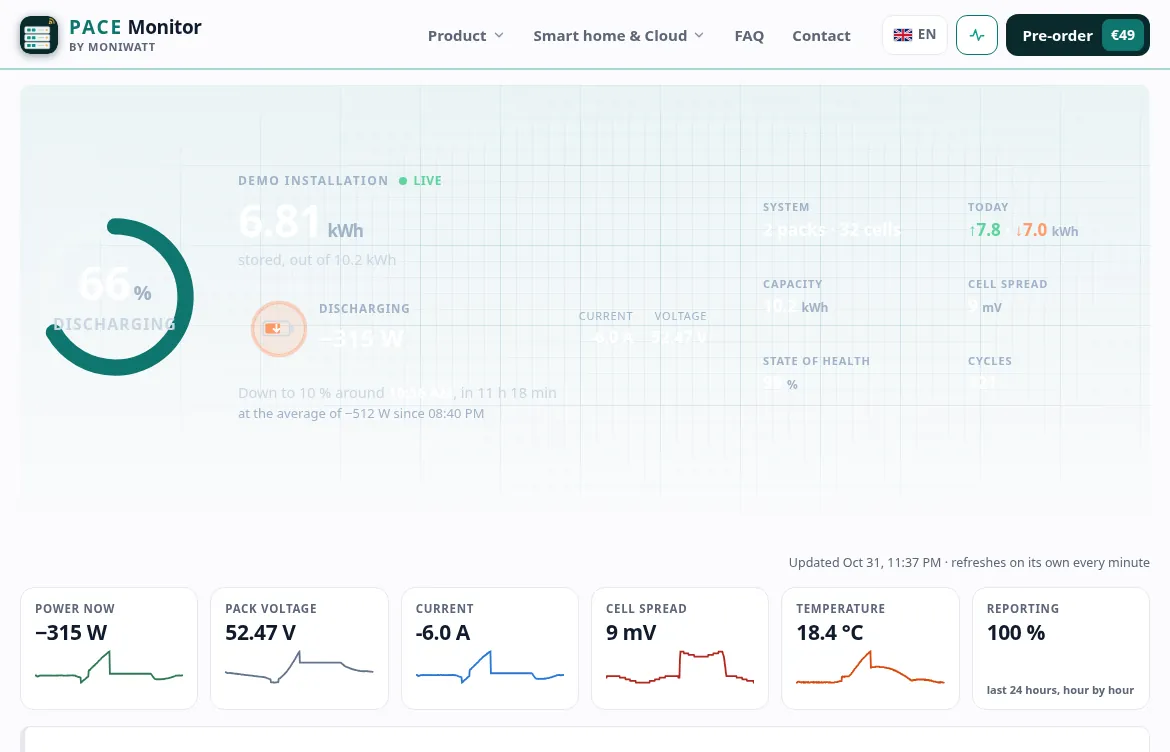
Online dashboard of Pace Monitor, demo mode
How it works

From your box to your phone, wherever you are

The box sends its readings out, encrypted. Nothing comes in: no port to open on your router, no VPN, no dynamic DNS.

Your Pace batteryread every few seconds
RS485
Pace Monitorat home, on your Wi-Fi
HTTPS · ≈ 2 min
The free Cloudhistory, alerts, sharing
anywhere
Your phone or PCany browser, no app
Switch it on

Three steps, two minutes

Off by default. Here is all it takes, with the real screens.

  1. 1Tick one box

    On the box’s page, Settings › Access key & Cloud: tick “Send readings to the free Cloud” and save. Copy the access key shown above it.

    Access key & Cloud

    Access key

    K7Q2M9XA41

    ✓Send readings to the free Cloud (pace-monitor.com)

    Save
  2. 2Sign in with your e-mail

    On pace-monitor.com/dashboard, type your e-mail: you get a one-time sign-in link. No password to remember.

    Sign in

    [email protected]Send me a sign-in link
  3. 3Link your box

    Paste the access key, give the box a name, done. The first readings appear within two minutes.

    Link your first box

    Access key

    K7Q2M9XA41

    Name

    GarageLink this box
Included

Everything, for free

Live dashboard from anywhereCharge, power, every cell and temperature, with the day so far.
Up to 3 years of historyZoom on any day, compare seasons, read the trend.
CSV exportEverything stored, ready for your spreadsheet.
E-mail alertsCharge, temperature, alarms, a box that goes silent: one e-mail per event.
Installer accessYour installer follows the system with their own access; you keep yours.
Private JSON linkFor a widget, IFTTT or Make: your live values, without opening anything at home.
Alerts

You choose what deserves an e-mail

Set per box in your account. One e-mail per event, then nothing until the value is back to normal. In your profile, one more: an e-mail if a box stays silent for 6 hours.

Examples of alerts →

Your data stays yours

Live demo

See your dashboard before it arrives

What you see is the production dashboard, running on a simulated Pace battery. Explore freely: no account, no download.

  • Health check in plain wordsGreen, amber or red for each point, with the reason.
  • Every pack, every cellSpread, temperatures and balance at a glance.
  • Your battery’s dayStored, given back, time left at the current pace.
  • Up to 3 years of curvesZoom on any day, export everything as CSV.

Open the live demo

In detail

The Cloud for Pace owners

What you see online

The online dashboard shows what Pace Monitor reads: state of charge and state of health, pack voltage, current and power, all 16 cell voltages with the spread, the temperatures, the cycle count and any warning or protection reported by the board. It refreshes about every two minutes, without port forwarding, VPN or dynamic DNS.

Battery makers configure Pace boards differently; the dashboard simply shows the values your board reports.

Switching it on

  1. On the local dashboard at http://moniwatt.local, open Settings > Access key & Cloud.
  2. Tick the option, save, and copy the access key.
  3. Sign in to the Cloud dashboard of this site with your e-mail and paste the key.

Readings appear within two minutes.

The record PbmsTools does not keep

Up to three years of history show how the rack ages: the state of health month after month, the cell spread at the end of each charge, the temperatures of the summer. Export any period as CSV, useful if you ever have to discuss a warranty claim.

An e-mail if it goes quiet

When the box has sent nothing for six hours, one e-mail tells you. A tripped socket or a router that lost power is the usual reason. Nothing more until the box is back.

Installer access

If an installer looks after the rack, they can add it to their own account with the access key you share. You keep your own access and can change the key at any time.

Off by default, free when on

No subscription. Readings travel encrypted to a private link opened only by your key. Untick the option and sending stops at once; stored readings are deleted on request. Without the Cloud, the box keeps working on your network as before.

Questions about the Cloud

Is the Cloud really free?

Free, for good. Buying the box gives you the live dashboard, three years of history, CSV export and e-mail alerts, with nothing to pay each month.

Do I need a password?

No. Signing in only takes your e-mail address, which receives a one-time link. Then the access key of the box attaches it to your account.

What happens if the internet goes down?

Only the Cloud pauses. The screen, the local dashboard and Home Assistant do not need the internet. When the connection returns the Cloud catches up, and a 6-hour silence from the box can trigger an e-mail.

Can someone else follow my system?

Yes. Your installer, or anyone you give the access key to, can link the box to their own account. You can change the key whenever you like.

How do I stop it and remove my data?

Switch the option off in the box settings: sending stops right away. Want the history gone too? Ask by e-mail and the stored readings are deleted.

All questions →

Keep reading

See what the Pace board inside your rack knows

Order Pace Monitor, shipped on 10 November 2026 and tested on a Pace BMS before it leaves.

Plug & play: working in about a minute

Pre-order for €49Pre-order price · €59 from 10 Nov · ships on 10 November 2026 · free cancellation until dispatch