Every cell
- Each cell voltage
- Lowest, highest and average
- Cell gap (delta)
The cell that drifts is the one that will limit your whole pack: you see it first.
Product
Smart home & Cloud
Ships on 10 November 2026 · free cancellation until dispatch
Home / What Pace Monitor reads from the board
What PbmsTools shows on a laptop, available all the time without one.
Plug & playConnect the cable, pick your Wi-Fi, and that is it, in roughly a minute. The box comes set up for your Pace, with no app and no tools.See the 3 steps →
Read from the RS485 port, refreshed every few seconds, explained in plain words.
The cell that drifts is the one that will limit your whole pack: you see it first.
Know whether the balancer actually works, and when.
What the pack is doing right now, charging or discharging, and how fast.
A garage in winter or a hot loft in summer: you see it before the BMS limits the current.
Understand why the battery stopped charging, without opening the app next to it.
Follow how the pack ages, month after month.
Model and firmware decide the final list. Give us yours with the order: the box leaves prepared and checked for that exact model.
Pick a situation: this is what Pace Monitor shows you about each cell of your Pace pack. Values simulated.
Instead of raw registers, the dashboard answers the questions you really ask.
In one sentence: balancing from one cell to another, waiting for the start voltage, or resting under the trigger.
The one that runs ahead at full charge and falls behind when the pack is low: usually the weakest cell.
The cell gap at the top of each charge, with its trend: stable, shrinking or growing.
At the current pace, when the pack will be full, or reach its cut-off.
A one-off setup per box in the free Cloud, then e-mails arrive on their own, without any app running.
Pace Monitor · just now
Battery at 18 %, below your 20 % alert
Your battery dropped below the threshold you set. It is discharging at 1.2 kW: about 1 h 40 min left at this pace.
Open the dashboard
The screen shows the present. The free Cloud keeps everything else.
What each option really gives you, in short.
| Bluetooth app | Wi-Fi dongle and maker’s cloud | Pace Monitor | |
|---|---|---|---|
| Readable from anywhere in the world | — | ✓ | ✓ |
| Keeps working without internet | ✓ | — | ✓ |
| Home Assistant sensors without ESP32 or YAML | — | — | ✓ |
| A screen next to the equipment | — | — | ✓ |
| Never changes a setting | — | — | ✓ |
Cell probes, MOSFET and ambient: up to six values depending on the board.
Warnings, protections and faults, decoded into readable text, and the current state of the pack: charging, discharging, standby.
Battery makers order Pace boards and fit them under their own brand, with different firmware and front panels. Owners report Pace boards in Jakiper and Gobel Power racks, among others, but the label alone proves nothing: two batteries with the same name can differ. Tell us the battery name, the board reference if you can see it in PbmsTools, and send a photo of the front panel: we check and test that version before shipping.
| Where | What |
|---|---|
| Screen | Charge, voltage, current, power, status |
http://moniwatt.local | Live cells, warnings, temperatures, daily chart |
| Home Assistant | Auto-created device over MQTT |
| JSON API | All values for your scripts |
| Cloud dashboard (optional, free) | History, CSV, alerts |
Open the same dashboard owners use, running on a simulated Pace battery. No account needed.
Open the live demo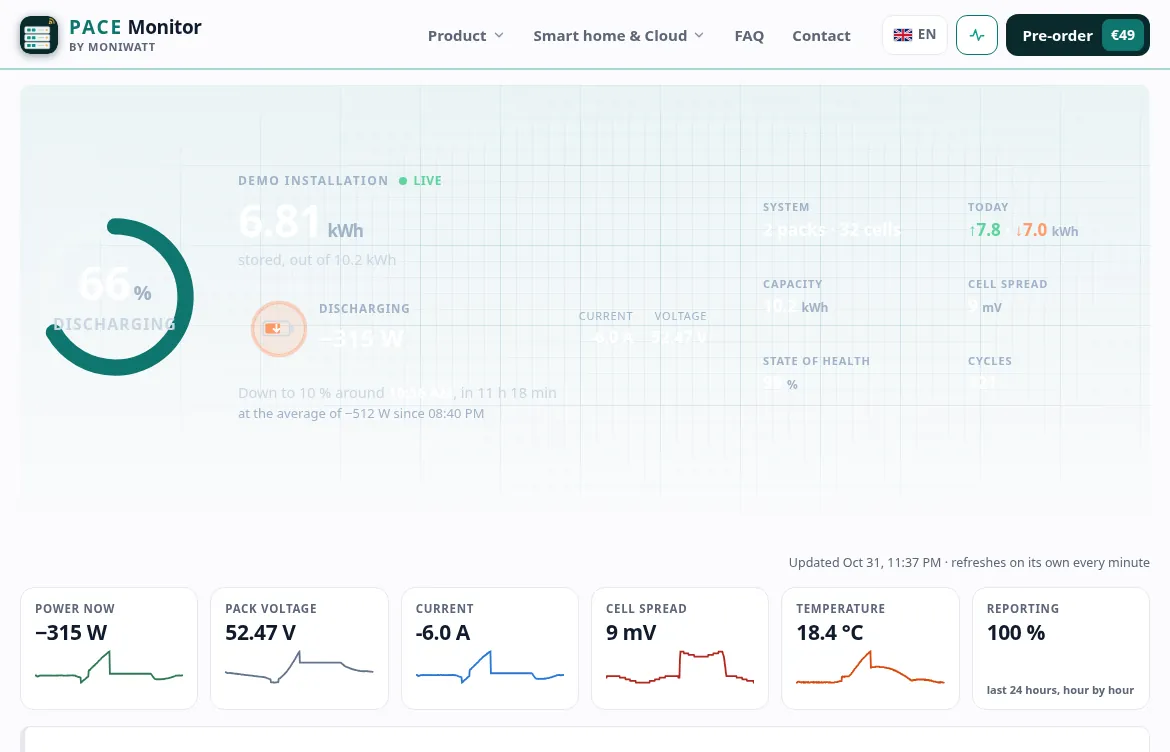
Order Pace Monitor, shipped on 10 November 2026 and tested on a Pace BMS before it leaves.
Plug & play: working in about a minute